Why We Started Looking at Rook-Ceph
Storage is usually the part of a Kubernetes setup that nobody wants to own. Stateless apps are easy: scale them up, kill pods, deploy canary versions, and nothing breaks. But the moment you introduce a database, a message broker, or any stateful workload that writes to persistent disks, you need volumes that seamlessly survive node restarts and hardware failures. That is where Kubernetes storage gets interesting.
We had been running Longhorn on smaller clusters, and it did the job well. However, as our infrastructure matured and we needed shared filesystems (ReadWriteMany) and S3-compatible object buckets alongside replicated block volumes, we constantly ended up deploying and maintaining three separate storage engines. That friction prompted us to evaluate Rook-Ceph.
In this guide, we walk through our architecture decisions, compare Rook-Ceph against Longhorn, prepare raw storage devices on Kubernetes nodes (RKE2), deploy Rook-Ceph with Helm, and validate block storage with an end-to-end PersistentVolumeClaim (PVC).
What is Rook? Architecture & Core Daemons
Rook is an open-source, cloud-native storage orchestrator for Kubernetes and a graduated CNCF project. It turns Ceph into a self-healing Kubernetes service.
Rook itself does not store user data. Instead, it acts as the Kubernetes operator that automates the deployment, provisioning, configuration, scaling, and upgrade lifecycles of Ceph daemons inside your cluster.
Ceph is the underlying distributed software-defined storage engine. Battle-tested for over a decade in hyperscale environments, Ceph unifies three distinct storage types from a single physical pool:
- Block Storage (RBD): Low-latency block devices mounted by a single pod (
ReadWriteOnce/ RWO PVCs) for databases, queues, and persistent application state. - Shared Filesystem (CephFS): POSIX-compliant shared filesystem mounted concurrently by multiple pods (
ReadWriteMany/ RWX PVCs) for file uploads, CMS platforms, or shared datasets. - Object Storage (RGW): S3 and Swift-compatible object store gateway for cloud-native backups, logs, ML models, and media artifacts.
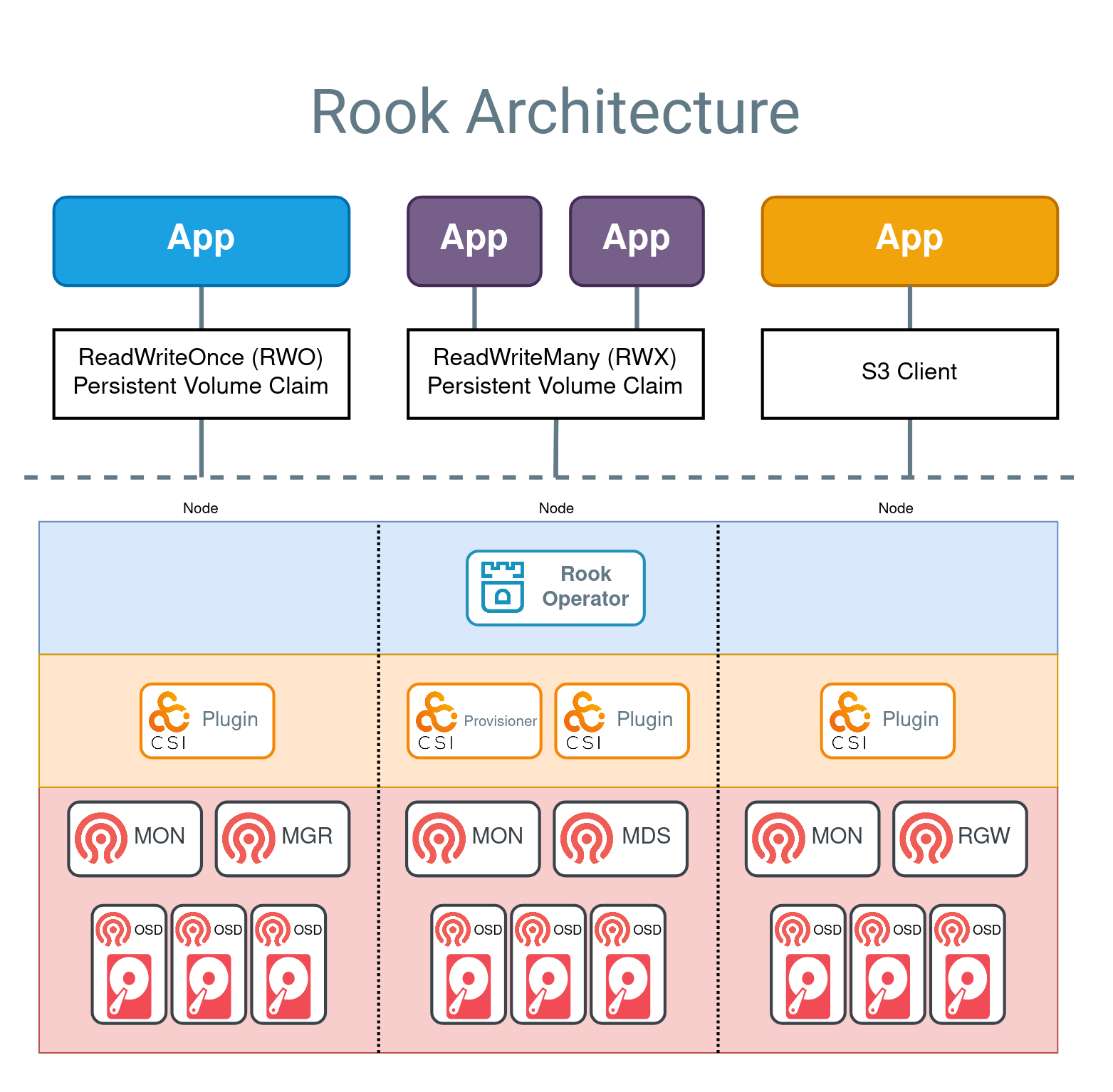
       +-------------------------------------------------------+
       |                  Kubernetes Workloads                 |
       +-------------------------------------------------------+
           | (RWO Block)           | (RWX File)          | (S3 API)
           v                       v                     v
     +------------+         +---------------+      +-------------+
     |  Ceph RBD  |         |    CephFS     |      |  Ceph RGW   |
     | CSI Plugin |         |  CSI Plugin   |      |  (S3 REST)  |
     +------------+         +---------------+      +-------------+
           |                       |                     |
           +-----------------------+---------------------+
                                   |
                   +-------------------------------+
                   |    Rook Ceph Operator (CRDs)  |
                   +-------------------------------+
                                   |
        +--------------------------+--------------------------+
        |                          |                          |
   +---------+                +---------+                +---------+
   |  MONs   |                |  MGRs   |                |  OSDs   |
   | (Quorum)|                |(Metrics)|                | (Disks) |
   +---------+                +---------+                +---------+
Core Rook-Ceph Pods in the Cluster
Once deployed, the rook-ceph namespace runs several specialized daemons:
rook-ceph-operator: The operator controller that watches Rook Custom Resource Definitions (CRDs) and reconciles Ceph cluster state.rook-ceph-mon: Ceph Monitors maintaining the master cluster map, consensus, and state quorum. A production cluster typically runs 3 or 5 monitors across different nodes.rook-ceph-mgr: Ceph Manager daemons providing monitoring metrics, the built-in management dashboard, and external Prometheus exporters.rook-ceph-osd: Object Storage Daemons. Each physical raw drive or partition assigned to Ceph runs an OSD pod. OSDs handle data reads, replication, erasure coding, rebalancing, and disk writes.rook-ceph-mds: Metadata Servers required whenever CephFS shared filesystems are enabled.rook-ceph-rgw: RADOS Gateway HTTP daemons presenting the S3-compatible REST API.csi-rbdplugin&csi-cephfsplugin: Ceph CSI driver controller and node plugins that interface Kubernetes volume requests with Ceph pools.
Rook-Ceph vs. Longhorn: Which Should You Choose?
Both Rook-Ceph and Longhorn are widely used for persistent storage in Kubernetes environments, especially on Rancher and RKE2 clusters. Here is an architectural and operational comparison:
| Feature | Rook-Ceph | Longhorn |
|---|---|---|
| Supported Storage Types | Block (RBD), Shared File (CephFS), Object (S3 RGW) | Block storage only (RWX requires an extra NFS share-manager) |
| Data Distribution | CRUSH algorithm stripes data evenly across all disks | Controller/replica model per volume placed on specific nodes |
| Replication Strategy | Distributed object striping across OSDs | Full disk copy per replica on target nodes |
| Data Redundancy | Multi-way replication & Erasure Coding (e.g., 4+2) | Replicas only (higher storage overhead) |
| Scalability | Petabyte-scale, hundreds of nodes | Ideal for small to mid-sized clusters |
| ReadWriteMany (RWX) | Native kernel/CSI driver directly to OSDs | Simulated via NFS pod proxy (single point of contention) |
| Hardware Requirements | Dedicated raw disks, ≥ 4GB RAM per OSD, ≥ 10GbE network | Uses host filesystems, lightweight CPU & RAM footprint |
| Failure Domains | Granular CRUSH maps (node, rack, row, zone, DC) | Basic node and zone scheduling anti-affinity |
| Operational Curve | Moderate to High (requires understanding Ceph commands) | Low (very beginner-friendly web UI) |
Key Architectural Takeaways
- Native RWX Performance: Longhorn implements
ReadWriteManyvolumes by deploying an in-cluster NFS server pod in front of an RWO volume. While functional, that NFS pod becomes an I/O bottleneck and failure point. CephFS is inherently distributed; every client node talks directly to the Ceph OSDs. - Rebuild Speed: If a node fails in Longhorn, rebuilding a 1TB volume involves copying the entire 1TB replica sequentially across the network. Ceph slices data into discrete objects across all OSDs, allowing parallel recovery across dozens of disks simultaneously.
- Erasure Coding Savings: For large-scale data storage, 3x replication consumes 300% raw disk space. Ceph supports erasure coding (e.g., $k=4, m=2$), achieving enterprise-grade durability with only 50% storage overhead.
- Hardware Commitment: Ceph requires dedicated disks (not shared with host OS mounts), ample memory (3–4 GB per OSD recommended), and fast networks (10GbE or higher). For small test clusters or resource-constrained nodes, Longhorn is much easier to spin up.
When to Choose Rook-Ceph
Choose Rook-Ceph if:
- You require unified Block, Shared File, and Object storage under one control plane.
- You are operating on bare-metal, on-premise, or hybrid clouds and want a consistent storage API without cloud vendor lock-in.
- Your workloads demand native high-throughput
ReadWriteManyperformance (CI/CD caches, AI/ML datasets, document stores). - You manage petabyte-scale storage clusters and want to save disk capacity with erasure coding.
- Your infrastructure spans multiple failure domains (e.g., racks, power zones) and requires strict placement rules.
Stick with Longhorn or simpler solutions if:
Your cluster has fewer than 3 nodes or lacks dedicated empty storage disks.
You only need simple block volumes (
ReadWriteOnce).Your team prefers an intuitive zero-overhead GUI without learning Ceph internals (
ceph status, placement groups, CRUSH hierarchy).
Prerequisites and Infrastructure Planning
Before applying any Kubernetes manifests, verify that your nodes satisfy the operational requirements.
1. Kubernetes & Compute Requirements
Kubernetes v1.32+ (tested here on RKE2 v1.36.5).
Architecture: amd64 (x86_64) or arm64.
Cluster sizing: Minimum of 3 worker/storage nodes to satisfy default Ceph monitor quorum (3 MONs) and standard 3-replica pools.
Check your cluster nodes:
kubectl get nodes -o wide
kubectl get nodes -o wide
NAME           STATUS   ROLES                AGE    VERSION          INTERNAL-IP   EXTERNAL-IP   OS-IMAGE             KERNEL-VERSION              CONTAINER-RUNTIME
rook-ceph-01   Ready    control-plane,etcd   6d1h   v1.36.5+rke2r1   172.21.0.9    <none>        Ubuntu 24.04.4 LTS   6.8.0-134-generic (amd64)   containerd://2.3.4-k3s1
2. Disk Preparation: Wiping and Resetting Storage Drives
Ceph requires clean, unformatted raw devices or partitions with no existing filesystem signatures, LVM headers, or GPT partition tables.
[!WARNING] Running the following disk wipe commands destroys all existing data on the target drive. Ensure you verify the device identifier (e.g.,
/dev/vdb) before executing!
Check the existing storage layout using lsblk:
lsblk
NAME    MAJ:MIN RM  SIZE RO TYPE MOUNTPOINTS
vda     253:0    0   20G  0 disk
├─vda1  253:1    0   19G  0 part /
├─vda14 253:14   0    4M  0 part
├─vda15 253:15   0  106M  0 part /boot/efi
└─vda16 259:0    0  913M  0 part /boot
vdb     253:16   0   50G  0 disk
vdc     253:32   0    1M  0 disk
In our environment, /dev/vda is the OS disk, /dev/vdc is a cloud-init config drive, and /dev/vdb (50 GB) is our dedicated Ceph target disk on all three nodes.
To completely reset /dev/vdb and wipe lingering partition tables, GPT signatures, and filesystem headers, run these commands on each storage node:
# Discard sectors and wipe beginning/end blocks
sudo blkdiscard -f /dev/vdb 2>/dev/null || true
sudo dd if=/dev/zero of=/dev/vdb bs=1M count=200 status=progress oflag=direct,dsync
sudo dd if=/dev/zero of=/dev/vdb bs=1M count=1000 seek=$(($(blockdev --getsz /dev/vdb)/2048 - 1000)) status=progress oflag=direct,dsync

# Wipe filesystem magic signatures and zap partition tables
sudo wipefs -a -f /dev/vdb
sudo sgdisk --zap-all /dev/vdb
sudo partprobe /dev/vdb
Step-by-Step Installation Using Helm
We deploy Rook-Ceph using official Helm charts. Rook structures deployment across two charts:
rook-ceph: Installs the operator, CRDs, admission controllers, and CSI drivers.rook-ceph-cluster: Deploys the actualCephClusterresource, storage pools, and StorageClasses.
Step 1: Deploy the Rook-Ceph Operator
Add the official Rook repository and update your Helm cache:
helm repo add rook-release https://charts.rook.io/release
helm repo update
Install the rook-ceph operator in the rook-ceph namespace:
helm upgrade --install --create-namespace \
  --namespace rook-ceph \
  rook-ceph rook-release/rook-ceph
Verify that the operator pod is running:
kubectl get pods -n rook-ceph
NAME                                           READY   STATUS    RESTARTS   AGE
ceph-csi-controller-manager-6dc6ff9685-llzs7   1/1     Running   0          46s
rook-ceph-operator-797f87d897-srp5x            1/1     Running   0          46s
Step 2: Install the Ceph CSI Drivers
To allow Kubernetes to mount Ceph volumes via CSI plugins, install the ceph-csi-drivers chart:
helm repo add ceph-csi-operator https://ceph.github.io/ceph-csi-operator
helm repo update

helm install ceph-csi-drivers --namespace rook-ceph ceph-csi-operator/ceph-csi-drivers \
  -f https://raw.githubusercontent.com/rook/rook/v1.21.1/deploy/charts/ceph-csi-drivers/values.yaml
Verify the CSI controller and node plugin daemonsets:
kubectl get pods -n rook-ceph -l 'app in (ceph-csi-controller-manager, rook-ceph-operator)'
kubectl get daemonset -n rook-ceph
You should see active pods for rook-ceph.cephfs.csi.ceph.com-nodeplugin and rook-ceph.rbd.csi.ceph.com-nodeplugin running on every storage node.
Step 3: Provision the Ceph Cluster (overrides.yaml)
By default, the rook-ceph-cluster chart attempts to claim all available storage devices on all nodes (useAllDevices: true). To prevent accidental claims of host partitions or cloud-init config drives (vdc), we create a customized overrides.yaml explicitly targeting /dev/vdb.
Create overrides.yaml:
# overrides.yaml - Custom configuration for Rook-Ceph cluster
# Default values for a single rook-ceph cluster
# This is a YAML-formatted file.
# Declare variables to be passed into your templates.

# -- Namespace of the main rook operator
operatorNamespace: rook-ceph

# -- The metadata.name of the CephCluster CR
# @default -- The same as the namespace
clusterName:

# -- Optional override of the target kubernetes version
kubeVersion:

# -- Cluster ceph.conf override
configOverride:
# configOverride: |
#   [global]
#   mon_allow_pool_delete = true
#   osd_pool_default_size = 3
#   osd_pool_default_min_size = 2

# Installs a debugging toolbox deployment
toolbox:
  # -- Enable Ceph debugging pod deployment. See [toolbox](../Troubleshooting/ceph-toolbox.md)
  enabled: true
  # -- The repository from which to pull the toolbox image
  # @default -- `.Values.cephImage.repository`
  repository: #quay.io/ceph/ceph
  # -- The tag of the toolbox image
  # @default -- `.Values.cephImage.tag`
  tag: #v20.2.4
  # -- Toolbox image, superseded by `toolbox.repository` and `toolbox.tag`
  # @default -- the image used by the Ceph cluster
  image: #quay.io/ceph/ceph:v20.2.4
  # -- Toolbox tolerations
  tolerations: []
  # -- Toolbox affinity
  affinity: {}
  # -- Toolbox labels
  labels: {}
  # -- Toolbox container security context
  containerSecurityContext:
    runAsNonRoot: true
    runAsUser: 2016
    runAsGroup: 2016
    capabilities:
      drop: ["ALL"]
  # -- Toolbox resources
  resources:
    limits:
      memory: "1Gi"
    requests:
      cpu: "100m"
      memory: "128Mi"
  # -- Set the priority class for the toolbox if desired
  priorityClassName:

  # -- Add additional volumes to the toolbox pod.
  # Note that this is subject to the SCC defined in ./templates/securityContextConstraints.yaml on OpenShift.
  additionalVolumes: []
  # -- Add additional volume mounts to the toolbox pod
  additionalVolumeMounts: []
  # -- Add additional environment variables to the toolbox pod
  additionalEnv: []
  # -- Add additional environment variable sources to the toolbox pod
  additionalEnvFrom: []

monitoring:
  # -- Enable Prometheus integration, will also create necessary RBAC rules to allow Operator to create ServiceMonitors.
  # Monitoring requires Prometheus to be pre-installed
  enabled: false
  # -- Whether to disable the metrics reported by Ceph. If false, the prometheus mgr module and Ceph exporter are enabled
  metricsDisabled: false
  # -- Whether to create the Prometheus rules for Ceph alerts
  createPrometheusRules: false
  # -- Edit Prometheus rules for Ceph alerts
  prometheusRuleOverrides: {}
    # CephHealthWarning:
    #   disabled: true
    # NVMeoFHighWriteLatency:
    #   for: 3m
    #   labels:
    #     severity: critical
  # -- The namespace in which to create the prometheus rules, if different from the rook cluster namespace.
  # If you have multiple rook-ceph clusters in the same k8s cluster, choose the same namespace (ideally, namespace with prometheus
  # deployed) to set rulesNamespaceOverride for all the clusters. Otherwise, you will get duplicate alerts with multiple alert definitions.
  rulesNamespaceOverride:
  # Monitoring settings for external clusters:
  # externalMgrEndpoints: <list of endpoints>
  # externalMgrPrometheusPort: <port>
  # Scrape interval for prometheus
  # interval: 10s
  # Scrape timeout for prometheus, in seconds. Must not be greater than the interval.
  # scrapeTimeoutSeconds: 5
  # Enable native HTTPS on the Ceph mgr prometheus endpoint (Ceph v20.2+).
  # Rook mounts the TLS Secret and configures the prometheus module; it does not create certificates.
  # metricsTLS:
  #   secretName: rook-ceph-prometheus-server-tls
  #   ca:
  #     configMap:
  #       name: rook-ceph-mgr-metrics-service-ca
  #       key: service-ca.crt
  # allow adding custom labels and annotations to the prometheus rule
  prometheusRule:
    # -- Labels applied to PrometheusRule
    labels: {}
    # -- Annotations applied to PrometheusRule
    annotations: {}

# imagePullSecrets option allow to pull docker images from private docker registry. Option will be passed to all service accounts.
# imagePullSecrets:
# - name: my-registry-secret

# Labels and annotations to add to the CephCluster CR
cephClusterMetadata:
  annotations: {}
  labels: {}

# Specify these values to override the Ceph image in the cephClusterSpec below.
# If specifying these values, do not include the cephVersion section in the cephClusterSpec.
cephImage:
  # The repository from which to pull the ceph image
  repository: quay.io/ceph/ceph
  # In production, use a specific version tag instead of the general v20 flag, which pulls the latest release and could result in different
  # versions running within the cluster. See tags available at https://hub.docker.com/r/ceph/ceph/tags/.
  # To be more precise, you can always use a timestamp tag such as quay.io/ceph/ceph:v20.2.4-20260818
  tag: v20.2.4
  # Whether to allow unsupported versions of Ceph. Currently Squid and Tentacle are supported.
  # Future versions would require this to be set to `true`.
  # Do not set to true in production.
  allowUnsupported: false
  # The image pull policy for pulling the ceph image in the ceph daemon pods, defaults to IfNotPresent
  # imagePullPolicy: IfNotPresent

# All values below are taken from the CephCluster CRD
# -- Cluster configuration.
# @default -- See [below](#ceph-cluster-spec)
cephClusterSpec:
  # This cluster spec example is for a converged cluster where all the Ceph daemons are running locally,
  # as in the host-based example (cluster.yaml). For a different configuration such as a
  # PVC-based cluster (cluster-on-pvc.yaml), external cluster (cluster-external.yaml),
  # or stretch cluster (cluster-stretched.yaml), replace this entire `cephClusterSpec`
  # with the specs from those examples.
  # For more details, check https://rook.io/docs/rook/v1.10/CRDs/Cluster/ceph-cluster-crd/

  # The path on the host where configuration files will be persisted. Must be specified. If there are multiple clusters, the directory must be unique for each cluster.
  # Important: if you reinstall the cluster, make sure you delete this directory from each host or else the mons will fail to start on the new cluster.
  # In Minikube, the '/data' directory is configured to persist across reboots. Use "/data/rook" in Minikube environment.
  dataDirHostPath: /var/lib/rook

  # Whether or not upgrade should continue even if a check fails
  # This means Ceph's status could be degraded and we don't recommend upgrading but you might decide otherwise
  # Use at your OWN risk
  # To understand Rook's upgrade process of Ceph, read https://rook.io/docs/rook/v1.10/Upgrade/ceph-upgrade/
  skipUpgradeChecks: false

  # Whether or not continue if PGs are not clean during an upgrade
  continueUpgradeAfterChecksEvenIfNotHealthy: false

  # WaitTimeoutForHealthyOSDInMinutes defines the time (in minutes) the operator would wait before an OSD can be stopped for upgrade or restart.
  # If the timeout exceeds and OSD is not ok to stop, then the operator would skip upgrade for the current OSD and proceed with the next one
  # if `continueUpgradeAfterChecksEvenIfNotHealthy` is `false`. If `continueUpgradeAfterChecksEvenIfNotHealthy` is `true`, then operator would
  # continue with the upgrade of an OSD even if its not ok to stop after the timeout. This timeout won't be applied if `skipUpgradeChecks` is `true`.
  # The default wait timeout is 10 minutes.
  waitTimeoutForHealthyOSDInMinutes: 10

  # Whether or not requires PGs are clean before an OSD upgrade. If set to `true` OSD upgrade process won't start until PGs are healthy.
  # This configuration will be ignored if `skipUpgradeChecks` is `true`.
  # Default is false.
  upgradeOSDRequiresHealthyPGs: false

  security:
    cephx:
      csi:
        keyType: aes # required when Kubernetes nodes don't run Linux kernel 7.0+

  mon:
    # Set the number of mons to be started. Generally recommended to be 3.
    # For highest availability, an odd number of mons should be specified.
    count: 1
    # The mons should be on unique nodes. For production, at least 3 nodes are recommended for this reason.
    # Mons should only be allowed on the same node for test environments where data loss is acceptable.
    allowMultiplePerNode: false

  mgr:
    # When higher availability of the mgr is needed, increase the count to 2.
    # In that case, one mgr will be active and one in standby. When Ceph updates which
    # mgr is active, Rook will update the mgr services to match the active mgr.
    count: 1
    allowMultiplePerNode: false
    modules:
      # List of modules to optionally enable or disable.
      # Note the "dashboard" and "monitoring" modules are already configured by other settings in the cluster CR.
      # The rook mgr module is not recommended. The only impact is that some small features will be disabled in the Ceph dashboard.
      - name: rook
        enabled: false

  # enable the ceph dashboard for viewing cluster status
  dashboard:
    enabled: true
    # serve the dashboard under a subpath (useful when you are accessing the dashboard via a reverse proxy)
    # urlPrefix: /ceph-dashboard
    # serve the dashboard at the given port.
    # port: 8443
    # Serve the dashboard using SSL (if using ingress to expose the dashboard and `ssl: true` you need to set
    # the corresponding "backend protocol" annotation(s) for your ingress controller of choice)
    ssl: false
    # The Kubernetes secret name in the current namespace to use as the dashboard SSL certificate, if the secret
    # type is kubernetes.io/tls and the private key is RSA. If not set, a self-signed certificate is created.
    # sslCertificateRef: rook-ceph-dashboard-tls

  # Network configuration, see: https://github.com/rook/rook/blob/master/Documentation/CRDs/Cluster/ceph-cluster-crd.md#network-configuration-settings
  network:
    connections:
      # Whether to encrypt the data in transit across the wire to prevent eavesdropping the data on the network.
      # The default is false. When encryption is enabled, all communication between clients and Ceph daemons, or between Ceph daemons will be encrypted.
      # When encryption is not enabled, clients still establish a strong initial authentication and data integrity is still validated with a crc check.
      # IMPORTANT: Encryption requires the 5.11 kernel for the latest nbd and cephfs drivers. Alternatively for testing only,
      # you can set the "mounter: rbd-nbd" in the rbd storage class, or "mounter: fuse" in the cephfs storage class.
      # The nbd and fuse drivers are *not* recommended in production since restarting the csi driver pod will disconnect the volumes.
      encryption:
        enabled: false
      # Whether to compress the data in transit across the wire. The default is false.
      # The kernel requirements above for encryption also apply to compression.
      compression:
        enabled: false
      # Whether to require communication over msgr2. If true, the msgr v1 port (6789) will be disabled
      # and clients will be required to connect to the Ceph cluster with the v2 port (3300).
      # Requires a kernel that supports msgr v2 (kernel 5.11 or CentOS 8.4 or newer).
      requireMsgr2: true
  #   # enable host networking
  #   provider: host
  #   # EXPERIMENTAL: enable the Multus network provider
  #   provider: multus
  #   selectors:
  #     # The selector keys are required to be `public` and `cluster`.
  #     # Based on the configuration, the operator will do the following:
  #     #   1. if only the `public` selector key is specified both public_network and cluster_network Ceph settings will listen on that interface
  #     #   2. if both `public` and `cluster` selector keys are specified the first one will point to 'public_network' flag and the second one to 'cluster_network'
  #     #
  #     # In order to work, each selector value must match a NetworkAttachmentDefinition object in Multus
  #     #
  #     # public: public-conf --> NetworkAttachmentDefinition object name in Multus
  #     # cluster: cluster-conf --> NetworkAttachmentDefinition object name in Multus
  #   # Provide internet protocol version. IPv6, IPv4 or empty string are valid options. Empty string would mean IPv4
  #   ipFamily: "IPv6"
  #   # Ceph daemons to listen on both IPv4 and Ipv6 networks
  #   dualStack: false

  # enable the crash collector for ceph daemon crash collection
  crashCollector:
    disable: false
    # Uncomment daysToRetain to prune ceph crash entries older than the
    # specified number of days.
    # daysToRetain: 30

  # enable log collector, daemons will log on files and rotate
  logCollector:
    enabled: true
    periodicity: daily # one of: hourly, daily, weekly, monthly
    maxLogSize: 500M # SUFFIX may be 'M' or 'G'. Must be at least 1M.

  # automate [data cleanup process](https://github.com/rook/rook/blob/master/Documentation/Storage-Configuration/ceph-teardown.md#delete-the-data-on-hosts) in cluster destruction.
  cleanupPolicy:
    # Since cluster cleanup is destructive to data, confirmation is required.
    # To destroy all Rook data on hosts during uninstall, confirmation must be set to "yes-really-destroy-data".
    # This value should only be set when the cluster is about to be deleted. After the confirmation is set,
    # Rook will immediately stop configuring the cluster and only wait for the delete command.
    # If the empty string is set, Rook will not destroy any data on hosts during uninstall.
    confirmation: ""
    # sanitizeDisks represents settings for sanitizing OSD disks on cluster deletion
    sanitizeDisks:
      # method indicates if the entire disk should be sanitized or simply ceph's metadata
      # in both case, re-install is possible
      # possible choices are 'complete' or 'quick' (default)
      method: quick
      # dataSource indicate where to get random bytes from to write on the disk
      # possible choices are 'zero' (default) or 'random'
      # using random sources will consume entropy from the system and will take much more time then the zero source
      dataSource: zero
      # iteration overwrite N times instead of the default (1)
      # takes an integer value
      iteration: 1
    # allowUninstallWithVolumes defines how the uninstall should be performed
    # If set to true, cephCluster deletion does not wait for the PVs to be deleted.
    allowUninstallWithVolumes: false

  # To control where various services will be scheduled by kubernetes, use the placement configuration sections below.
  # The example under 'all' would have all services scheduled on kubernetes nodes labeled with 'role=storage-node' and
  # tolerate taints with a key of 'storage-node'.
  # placement:
  #   all:
  #     nodeAffinity:
  #       requiredDuringSchedulingIgnoredDuringExecution:
  #         nodeSelectorTerms:
  #           - matchExpressions:
  #             - key: role
  #               operator: In
  #               values:
  #               - storage-node
  #     podAffinity:
  #     podAntiAffinity:
  #     topologySpreadConstraints:
  #     tolerations:
  #     - key: storage-node
  #       operator: Exists
  #   # The above placement information can also be specified for mon, osd, and mgr components
  #   mon:
  #   # Monitor deployments may contain an anti-affinity rule for avoiding monitor
  #   # collocation on the same node. This is a required rule when host network is used
  #   # or when AllowMultiplePerNode is false. Otherwise this anti-affinity rule is a
  #   # preferred rule with weight: 50.
  #   osd:
  #   mgr:
  #   cleanup:

  # annotations:
  #   all:
  #   mon:
  #   osd:
  #   cleanup:
  #   prepareosd:
  #   # If no mgr annotations are set, prometheus scrape annotations will be set by default.
  #   mgr:
  #   dashboard:

  # labels:
  #   all:
  #   mon:
  #   osd:
  #   cleanup:
  #   mgr:
  #   prepareosd:
  #   # monitoring is a list of key-value pairs. It is injected into all the monitoring resources created by operator.
  #   # These labels can be passed as LabelSelector to Prometheus
  #   monitoring:
  #   dashboard:

  resources:
    mgr:
      limits:
        memory: "1Gi"
      requests:
        cpu: "500m"
        memory: "512Mi"
    mon:
      limits:
        memory: "2Gi"
      requests:
        cpu: "1000m"
        memory: "1Gi"
    osd:
      limits:
        memory: "4Gi"
      requests:
        cpu: "1000m"
        memory: "4Gi"
    prepareosd:
      # limits: It is not recommended to set limits on the OSD prepare job
      #         since it's a one-time burst for memory that must be allowed to
      #         complete without an OOM kill.  Note however that if a k8s
      #         limitRange guardrail is defined external to Rook, the lack of
      #         a limit here may result in a sync failure, in which case a
      #         limit should be added.  1200Mi may suffice for up to 15Ti
      #         OSDs ; for larger devices 2Gi may be required.
      #         cf. https://github.com/rook/rook/pull/11103
      requests:
        cpu: "500m"
        memory: "50Mi"
    mgr-sidecar:
      limits:
        memory: "100Mi"
      requests:
        cpu: "100m"
        memory: "40Mi"
    crashcollector:
      limits:
        memory: "60Mi"
      requests:
        cpu: "100m"
        memory: "60Mi"
    logcollector:
      limits:
        memory: "1Gi"
      requests:
        cpu: "100m"
        memory: "100Mi"
    cleanup:
      limits:
        memory: "1Gi"
      requests:
        cpu: "500m"
        memory: "100Mi"
    exporter:
      limits:
        memory: "128Mi"
      requests:
        cpu: "50m"
        memory: "50Mi"
    cmd-reporter:
      limits:
        memory: "1Gi"
      requests:
        cpu: "500m"
        memory: "100Mi"

  # The option to automatically remove OSDs that are out and are safe to destroy.
  removeOSDsIfOutAndSafeToRemove: false

  # priority classes to apply to ceph resources
  priorityClassNames:
    mon: system-node-critical
    osd: system-node-critical
    mgr: system-cluster-critical

  storage: # cluster level storage configuration and selection
    useAllNodes: true
    useAllDevices: true

  disruptionManagement:
    # If true, the operator will create and manage PodDisruptionBudgets for OSD, Mon, RGW, and MDS daemons. OSD PDBs are managed dynamically
    # via the strategy outlined in the [design](https://github.com/rook/rook/blob/master/design/ceph/ceph-managed-disruptionbudgets.md). The operator will
    # block eviction of OSDs by default and unblock them safely when drains are detected.
    managePodBudgets: true
    # A duration in minutes that determines how long an entire failureDomain like `region/zone/host` will be held in `noout` (in addition to the
    # default DOWN/OUT interval) when it is draining. This is only relevant when  `managePodBudgets` is `true`. The default value is `30` minutes.
    osdMaintenanceTimeout: 30

  # Configure the healthcheck and liveness probes for ceph pods.
  # Valid values for daemons are 'mon', 'osd', 'status'
  healthCheck:
    daemonHealth:
      mon:
        disabled: false
        interval: 45s
      osd:
        disabled: false
        interval: 60s
      status:
        disabled: false
        interval: 60s
    # Change pod liveness probe, it works for all mon, mgr, and osd pods.
    livenessProbe:
      mon:
        disabled: false
      mgr:
        disabled: false
      osd:
        disabled: false

ingress:
  # -- Enable an ingress for the ceph-dashboard
  dashboard:
    # labels:
    #   external-dns/private: "true"
    # annotations:
    #   external-dns.alpha.kubernetes.io/hostname: dashboard.example.com
    #   nginx.ingress.kubernetes.io/rewrite-target: /ceph-dashboard/$2
    # If the dashboard has ssl: true the following will make sure the NGINX Ingress controller can expose the dashboard correctly
    #   nginx.ingress.kubernetes.io/backend-protocol: "HTTPS"
    #   nginx.ingress.kubernetes.io/server-snippet: |
    #     proxy_ssl_verify off;
    host:
      name: dashboard.example.com
      path: "/"
      pathType: Prefix
    tls:
    - hosts:
        - dashboard.example.com
      secretName: testsecret-tls
    ## Note: Only one of ingress class annotation or the `ingressClassName:` can be used at a time
    ## to set the ingress class
    # ingressClassName: nginx

cephBlockPools:
  - name: ceph-blockpool
    # see https://github.com/rook/rook/blob/master/Documentation/CRDs/Block-Storage/ceph-block-pool-crd.md#spec for available configuration
    spec:
      failureDomain: host
      replicated:
        size: 1
      # Enables collecting RBD per-image IO statistics by enabling dynamic OSD performance counters. Defaults to false.
      # For reference: https://docs.ceph.com/docs/latest/mgr/prometheus/#rbd-io-statistics
      # enableRBDStats: true
    storageClass:
      enabled: true
      name: ceph-block
      annotations: {}
      labels: {}
      isDefault: true
      reclaimPolicy: Delete
      allowVolumeExpansion: true
      volumeBindingMode: "Immediate"
      mountOptions: []
      # see https://kubernetes.io/docs/concepts/storage/storage-classes/#allowed-topologies
      allowedTopologies: []
      #        - matchLabelExpressions:
      #            - key: rook-ceph-role
      #              values:
      #                - storage-node
      # see https://github.com/rook/rook/blob/master/Documentation/Storage-Configuration/Block-Storage-RBD/block-storage.md#provision-storage for available configuration
      parameters:
        # (optional) mapOptions is a comma-separated list of map options.
        # For krbd options refer
        # https://docs.ceph.com/docs/latest/man/8/rbd/#kernel-rbd-krbd-options
        # For nbd options refer
        # https://docs.ceph.com/docs/latest/man/8/rbd-nbd/#options
        # mapOptions: lock_on_read,queue_depth=1024

        # (optional) unmapOptions is a comma-separated list of unmap options.
        # For krbd options refer
        # https://docs.ceph.com/docs/latest/man/8/rbd/#kernel-rbd-krbd-options
        # For nbd options refer
        # https://docs.ceph.com/docs/latest/man/8/rbd-nbd/#options
        # unmapOptions: force

        # RBD image format. Defaults to "2".
        imageFormat: "2"

        # RBD image features, equivalent to OR'd bitfield value: 63
        # Available for imageFormat: "2". Older releases of CSI RBD
        # support only the `layering` feature. The Linux kernel (KRBD) supports the
        # full feature complement as of 5.4
        imageFeatures: layering

        # These secrets contain Ceph admin credentials.
        csi.storage.k8s.io/provisioner-secret-name: rook-csi-rbd-provisioner
        csi.storage.k8s.io/provisioner-secret-namespace: "{{ .Release.Namespace }}"
        csi.storage.k8s.io/controller-expand-secret-name: rook-csi-rbd-provisioner
        csi.storage.k8s.io/controller-expand-secret-namespace: "{{ .Release.Namespace }}"
        csi.storage.k8s.io/controller-publish-secret-name: rook-csi-rbd-provisioner
        csi.storage.k8s.io/controller-publish-secret-namespace: "{{ .Release.Namespace }}"
        csi.storage.k8s.io/node-stage-secret-name: rook-csi-rbd-node
        csi.storage.k8s.io/node-stage-secret-namespace: "{{ .Release.Namespace }}"
        # Needed for VolumeAttributesClass (dynamic QoS modification on existing volumes).
        csi.storage.k8s.io/controller-modify-secret-name: rook-csi-rbd-provisioner
        csi.storage.k8s.io/controller-modify-secret-namespace: "{{ .Release.Namespace }}"
        # Needed for krbd QoS enforcement.
        csi.storage.k8s.io/node-publish-secret-name: rook-csi-rbd-node
        csi.storage.k8s.io/node-publish-secret-namespace: "{{ .Release.Namespace }}"
        # Specify the filesystem type of the volume. If not specified, csi-provisioner
        # will set default as `ext4`. Note that `xfs` is not recommended due to potential deadlock
        # in hyperconverged settings where the volume is mounted on the same node as the osds.
        csi.storage.k8s.io/fstype: ext4

# -- A list of CephFileSystem configurations to deploy
# @default -- See [below](#ceph-file-systems)
cephFileSystems:
  - name: ceph-filesystem
    # see https://github.com/rook/rook/blob/master/Documentation/CRDs/Shared-Filesystem/ceph-filesystem-crd.md#filesystem-settings for available configuration
    spec:
      metadataPool:
        replicated:
          size: 1
      dataPools:
        - failureDomain: host
          replicated:
            size: 1
          # Optional and highly recommended, 'data0' by default, see https://github.com/rook/rook/blob/master/Documentation/CRDs/Shared-Filesystem/ceph-filesystem-crd.md#pools
          name: data0
      metadataServer:
        activeCount: 1
        activeStandby: true
        resources:
          limits:
            memory: "4Gi"
          requests:
            cpu: "1000m"
            memory: "4Gi"
        priorityClassName: system-cluster-critical
    storageClass:
      enabled: true
      isDefault: false
      name: ceph-filesystem
      # (Optional) specify a data pool to use, must be the name of one of the data pools above, 'data0' by default
      pool: data0
      reclaimPolicy: Delete
      allowVolumeExpansion: true
      volumeBindingMode: "Immediate"
      annotations: {}
      labels: {}
      mountOptions: []
      # see https://github.com/rook/rook/blob/master/Documentation/Storage-Configuration/Shared-Filesystem-CephFS/filesystem-storage.md#provision-storage for available configuration
      parameters:
        # The secrets contain Ceph admin credentials.
        csi.storage.k8s.io/provisioner-secret-name: rook-csi-cephfs-provisioner
        csi.storage.k8s.io/provisioner-secret-namespace: "{{ .Release.Namespace }}"
        csi.storage.k8s.io/controller-expand-secret-name: rook-csi-cephfs-provisioner
        csi.storage.k8s.io/controller-expand-secret-namespace: "{{ .Release.Namespace }}"
        csi.storage.k8s.io/controller-publish-secret-name: rook-csi-cephfs-provisioner
        csi.storage.k8s.io/controller-publish-secret-namespace: "{{ .Release.Namespace }}"
        csi.storage.k8s.io/node-stage-secret-name: rook-csi-cephfs-node
        csi.storage.k8s.io/node-stage-secret-namespace: "{{ .Release.Namespace }}"
        # Specify the filesystem type of the volume. If not specified, csi-provisioner
        # will set default as `ext4`. Note that `xfs` is not recommended due to potential deadlock
        # in hyperconverged settings where the volume is mounted on the same node as the osds.
        csi.storage.k8s.io/fstype: ext4

# -- Settings for the filesystem snapshot class
# @default -- See [CephFS Snapshots](../Storage-Configuration/Ceph-CSI/ceph-csi-snapshot.md#cephfs-snapshots)
cephFileSystemVolumeSnapshotClass:
  enabled: false
  name: ceph-filesystem
  isDefault: true
  deletionPolicy: Delete
  annotations: {}
  labels: {}
  # see https://rook.io/docs/rook/v1.10/Storage-Configuration/Ceph-CSI/ceph-csi-snapshot/#cephfs-snapshots for available configuration
  parameters: {}

# -- Settings for the block pool snapshot class
# @default -- See [RBD Snapshots](../Storage-Configuration/Ceph-CSI/ceph-csi-snapshot.md#rbd-snapshots)
cephBlockPoolsVolumeSnapshotClass:
  enabled: false
  name: ceph-block
  isDefault: false
  deletionPolicy: Delete
  annotations: {}
  labels: {}

  parameters: {}

# -- A list of CephObjectStore configurations to deploy
# @default -- See [below](#ceph-object-stores)
cephObjectStores:
  - name: ceph-objectstore
    spec:
      metadataPool:
        failureDomain: host
        replicated:
          size: 1
      dataPool:
        failureDomain: host
        erasureCoded:
          dataChunks: 2
          codingChunks: 1
        parameters:
          bulk: "true"
      preservePoolsOnDelete: true
      gateway:
        port: 80
        resources:
          limits:
            memory: "2Gi"
          requests:
            cpu: "1000m"
            memory: "1Gi"
        instances: 1
        priorityClassName: system-cluster-critical

    storageClass:
      enabled: true
      name: ceph-bucket
      reclaimPolicy: Delete
      volumeBindingMode: "Immediate"
      annotations: {}
      labels: {}

      parameters:

        region: us-east-1
    ingress:
      enabled: true
      port: 80
      annotations: {}
      host:
        name: objectstore.example.com
        path: /
        pathType: Prefix
      tls:
      - hosts:
          - objectstore.example.com
        secretName: ceph-objectstore-tls
Deploy the Ceph cluster chart using our custom overrides:
helm install --create-namespace --namespace rook-ceph rook-ceph-cluster \
   --set operatorNamespace=rook-ceph rook-release/rook-ceph-cluster -f overrides.yaml
Monitor the cluster initialization:
kubectl get cephclusters -A -w
The operator spins up components in a deterministic sequence:
- Monitors (
mon) reach quorum. - Managers (
mgr) initialize metrics and dashboard services. osd-preparepods inspect/dev/vdbon each node, format with BlueStore, and create persistent metadata.osdpods launch and join the storage pool.- MDS and RGW daemons start up for file and object protocols.
When deployment is complete, verify all pods:
kubectl get pods -n rook-ceph
NAME                                                        READY   STATUS      RESTARTS   AGE
ceph-csi-controller-manager-6dc6ff9685-llzs7                1/1     Running     0          19m
rook-ceph-crashcollector-rook-ceph-02-66f7c8c47d-6kwp6      1/1     Running     0          68s
rook-ceph-exporter-rook-ceph-02-d95c64685-fv8cb             2/2     Running     0          64s
rook-ceph-mds-ceph-filesystem-a-655d58c9c4-jlwvl            2/2     Running     0          70s
rook-ceph-mds-ceph-filesystem-b-7d6bc5559-rl28t             2/2     Running     0          64s
rook-ceph-mgr-a-5df7569f9-qw5j9                             2/2     Running     0          3m39s
rook-ceph-mon-a-d9fdbc974-4nzlg                             2/2     Running     0          4m13s
rook-ceph-operator-7647d9896-5jcdx                          1/1     Running     0          4m26s
rook-ceph-osd-0-7f9cbff7c5-89ksf                            2/2     Running     0          2m46s
rook-ceph-osd-prepare-rook-ceph-02-t8sx9                    0/1     Completed   0          3m17s
rook-ceph-tools-748887bfd7-l5724                            1/1     Running     0          7m53s
rook-ceph.cephfs.csi.ceph.com-ctrlplugin-6d7c986d9d-8jdvz   6/6     Running     0          17m
rook-ceph.cephfs.csi.ceph.com-nodeplugin-997lx              3/3     Running     0          17m
rook-ceph.rbd.csi.ceph.com-ctrlplugin-79ddcd4948-4rf67      5/5     Running     0          17m
rook-ceph.rbd.csi.ceph.com-nodeplugin-sw4t5                 3/3     Running     0          17m
[!TIP] Always check for
Completedstatus onrook-ceph-osd-prepare-*jobs. If prepare jobs fail or no OSD pods start, inspect the prepare logs:kubectl -n rook-ceph logs -l app=rook-ceph-osd-prepare --tail=100
Step 4: Validating Ceph Health and Status
To inspect cluster health using native ceph CLI commands, run commands through the rook-ceph-tools pod:
kubectl -n rook-ceph exec -it deploy/rook-ceph-tools -- ceph status
  cluster:
    id:     c19b585d-a300-4c19-88a2-77a6929063f8
    health: HEALTH_OK

  services:
    mon: 1 daemons, quorum a (age 5d) [leader: a]
    mgr: a(active, since 4d)
    mds: 1/1 daemons up, 1 standby
    osd: 1 osds: 1 up, 1 in
    rgw: 2 daemons active

  data:
    volumes: 1/1 healthy
    pools:   22 pools, 441 pgs
    objects: 1.07k objects, 686 KiB
    usage:   1.3 GiB used, 74 GiB / 75 GiB avail
    pgs:     441 active+clean

  io:
    client:   20 KiB/s rd, 39 op/s rd, 0 op/s wr
Inspect the physical disk hierarchy and pool allocations:
# Check OSD placement tree
kubectl -n rook-ceph exec -it deploy/rook-ceph-tools -- ceph osd tree

# View disk capacity breakdown
kubectl -n rook-ceph exec -it deploy/rook-ceph-tools -- ceph df
kubectl -n rook-ceph exec -it deploy/rook-ceph-tools -- ceph health detail
[!NOTE] If you observe
HEALTH_WARNwith warnings likeAUTH_INSECURE_CLIENT_KEY_TYPE, this typically relates to Ceph’s transition to msgr2 encryption ciphers. In test/lab environments, you can silence or remediate this via:kubectl -n rook-ceph exec -it deploy/rook-ceph-tools -- ceph config set global mon_warn_on_insecure_global_id_reclaim false
Step 5: Validating Persistent Storage with a Test PVC
To verify that the Ceph CSI driver dynamically provisions block storage volumes, deploy a sample PersistentVolumeClaim and test pod:
# test-pvc.yaml
apiVersion: v1
kind: PersistentVolumeClaim
metadata:
  name: ceph-test
spec:
  accessModes: ["ReadWriteOnce"]
  storageClassName: ceph-block
  resources:
    requests:
      storage: 1Gi
---
apiVersion: v1
kind: Pod
metadata:
  name: ceph-test
spec:
  containers:
    - name: app
      image: busybox
      command: ["sh", "-c", "echo 'Hello from Rook-Ceph Persistent Storage' > /data/hello.txt && sleep 3600"]
      volumeMounts:
        - name: data
          mountPath: /data
  volumes:
    - name: data
      persistentVolumeClaim:
        claimName: ceph-test
Apply the manifest and inspect the PVC binding:
kubectl apply -f test-pvc.yaml
kubectl get pvc ceph-test
Verify that the application successfully wrote data to the mounted Ceph RBD image:
kubectl exec ceph-test -- cat /data/hello.txt
Hello from Rook-Ceph Persistent Storage
Clean up the test resources:
kubectl delete -f test-pvc.yaml
Step 6: Accessing the Ceph Management Dashboard
Rook deploys the Ceph Dashboard for real-time monitoring of cluster IOPS, pool capacity, OSD latency, and PG states.
Retrieve the generated dashboard administrator password:
kubectl -n rook-ceph get secret rook-ceph-dashboard-password \
  -o jsonpath="{['data']['password']}" | base64 -d && echo
Navigate to https://rook-ceph.internal.lab, log in as username admin with the retrieved password, and view your cluster topology.
Troubleshooting Common Rook-Ceph Issues
| Symptom | Root Cause | Solution |
|---|---|---|
| OSD pods never start | Target disk contains previous filesystem signatures or LVM headers. | Run blkdiscard, wipefs -a -f /dev/sdX, and sgdisk --zap-all /dev/sdX. Restart the operator. |
| Monitors stuck out of quorum | Inter-node latency is high or firewall drops port 6789/3300. | Ensure open TCP traffic on ports 6789, 3300, and 6800-7300. Verify node clocks are synced via NTP. |
PVC remains in Pending state | Missing CSI driver or deviceFilter regex failed to match disk. | Verify kubectl get sc matches ceph-block and check CSI provisioner logs with kubectl logs -n rook-ceph -l app=csi-rbdplugin. |
CrashLoopBackOff on rook-ceph-mgr | Resource limits too constrained or multiple managers conflicting. | Increase memory requests/limits in overrides.yaml (minimum 1GB RAM for mgr). |
What We Covered
In this guide, we built a complete cloud-native distributed storage platform on Kubernetes with Rook-Ceph in a single node config mode.:
- Storage Architecture Decoded: Explored how the Rook operator automates Ceph daemons (MONs, MGRs, OSDs, MDS, RGW, and CSI plugins).
- Rook-Ceph vs. Longhorn: Analyzed the technical trade-offs between distributed object-based striping and volume-level replication.
- Disk Sanitation: Cleaned and wiped raw block storage devices using
blkdiscard,dd,wipefs, andsgdiskto prepare them for Ceph BlueStore. - Declarative Helm Deployment: Deployed the
rook-cephoperator andceph-csi-drivers, configuring a production-alignedoverrides.yamlwith explicit disk filters. - Health Validation & Tooling: Leveraged
rook-ceph-toolsto runceph status,ceph osd tree, andceph dfto audit cluster health. - End-to-End PVC Testing: Provisioned an automated RBD PersistentVolumeClaim and verified data persistence inside a test pod.
- Dashboard Access: Retrieved credentials and accessed the Ceph administrative dashboard.
Conclusion & Next Steps
Deploying Rook-Ceph provides your Kubernetes clusters with enterprise-grade, software-defined distributed storage that rivals commercial SAN/NAS appliances and hyperscale cloud providers. By eliminating single points of failure and avoiding separate engines for files, blocks, and object buckets, Rook-Ceph provides a unified, self-healing foundation for all stateful workloads.
Next in this Series:
- Setting up CephFS shared filesystems for high-throughput
ReadWriteMany(RWX) workloads. - Configuring Multi-Site Replication for Rook-Ceph S3 (RGW) across independent clusters for disaster recovery and cross-region sync.
Join the Discussion: Have questions about sizing your OSDs or choosing between Ceph and Longhorn? Drop your comments below or connect with us on GitHub and LinkedIn.
Happy Kubernetes-ing! 🚀