Introduction
K3S is an light weight certified Kubernetes distribution, specifically designed for IoT and Edge computing
Architecture
K3S can be deployed on x86_64, ARMv7, and ARM64 architectures.
K3S has 2 main components Server and Agent
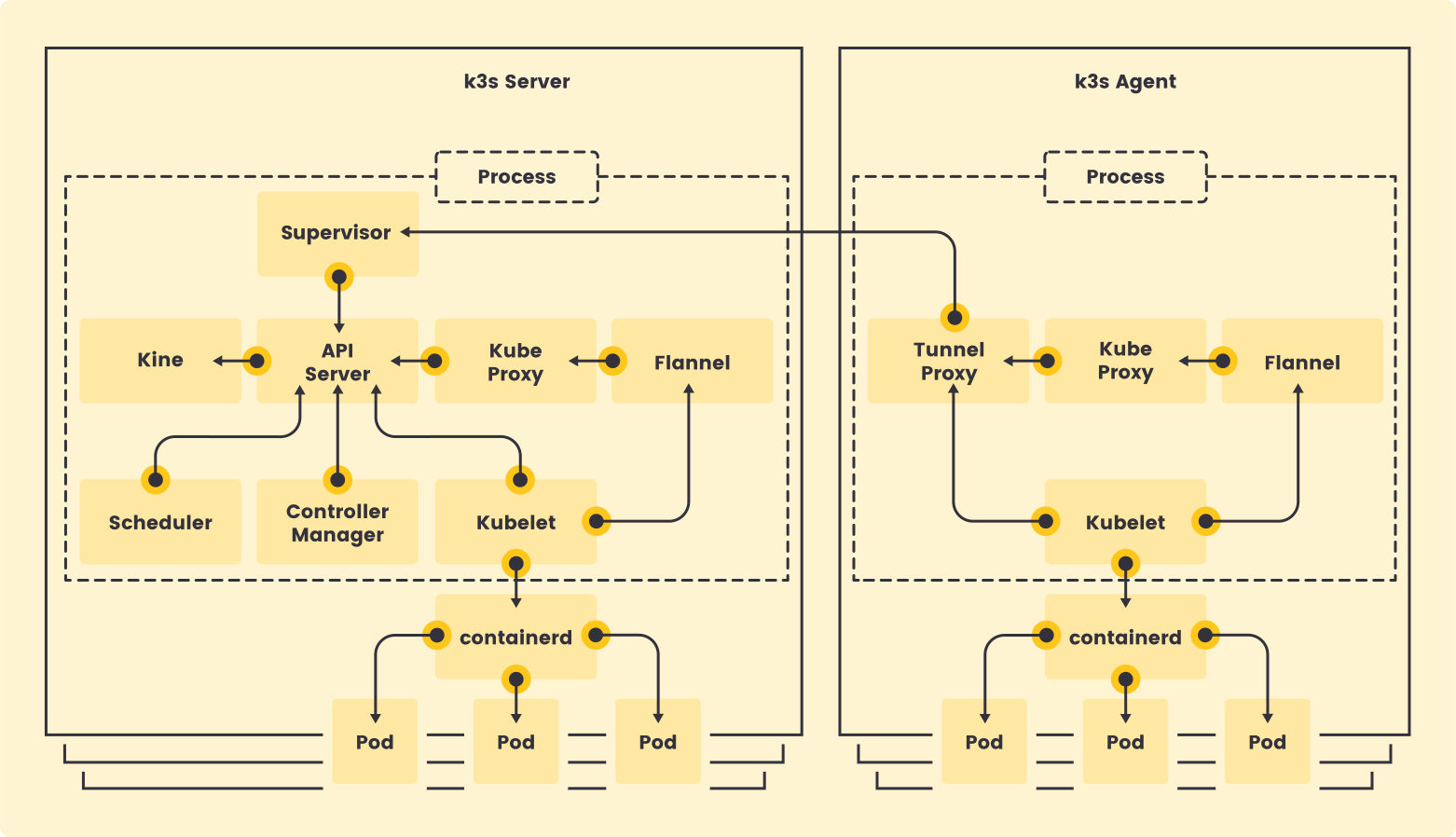
Setting up Environment
To Run K3S you can use vm managers like multipass or Virtualbox
In this example we will be using Vagrant and Virtualbox and the Operating system is Ubuntu.
Install Virtualbox
brew install --cask virtualbox
Install Vagrant on Mac
brew install --cask vagrant
vagrant version
Installed Version: 2.4.3
Latest Version: 2.4.3

You're running an up-to-date version of Vagrant!
Create an Folder and run vagrant init command
mkdir vms
cd vms

vagrant init bento/ubuntu-24.04 --box-version 202502.21.0
This will create an Vagrant File. if you wan to access the K3S from outside of vm you can update the configs by port-forwarding or using private_network
config.vm.network "forwarded_port", guest: 8080, host: 8080, host_ip: "127.0.0.1"
or
config.vm.network "private_network", ip: "192.168.33.10"
in Above case we will be using private_network, IP that you are going to use should not be conflict with existing network configurations.
Vagrant.configure("2") do |config|
  config.vm.box = "bento/ubuntu-24.04"
  config.vm.box_version = "202502.21.0"
  config.vm.network "private_network", ip: "192.168.33.40"
end
run vagrant up to start the vm in virtualbox.
once the vm is up and running you can ssh into the vm using
vagrant ssh

sudo bash
Installing and Configuring K3S
K3s Supports Multiple Datastores.
- Embedded SQLite
- Embedded etcd
- External Database
Here we will be using Embedded SQLite. Embedded SQLite has limitations.
for HA, use etcd or External Datastore
To install K3S on vm
curl -sfL https://get.k3s.io | sh -

[INFO]  Finding release for channel stable
[INFO]  Using v1.32.3+k3s1 as release
[INFO]  Downloading hash https://github.com/k3s-io/k3s/releases/download/v1.32.3+k3s1/sha256sum-arm64.txt
[INFO]  Downloading binary https://github.com/k3s-io/k3s/releases/download/v1.32.3+k3s1/k3s-arm64
[INFO]  Verifying binary download
[INFO]  Installing k3s to /usr/local/bin/k3s
[INFO]  Skipping installation of SELinux RPM
[INFO]  Creating /usr/local/bin/kubectl symlink to k3s
[INFO]  Creating /usr/local/bin/crictl symlink to k3s
[INFO]  Creating /usr/local/bin/ctr symlink to k3s
[INFO]  Creating killall script /usr/local/bin/k3s-killall.sh
[INFO]  Creating uninstall script /usr/local/bin/k3s-uninstall.sh
[INFO]  env: Creating environment file /etc/systemd/system/k3s.service.env
[INFO]  systemd: Creating service file /etc/systemd/system/k3s.service
[INFO]  systemd: Enabling k3s unit
Created symlink /etc/systemd/system/multi-user.target.wants/k3s.service → /etc/systemd/system/k3s.service.
[INFO]  systemd: Starting k3s
To check the real-time logs of the K3S service and ensure it is running correctly, use:
journalctl -u k3s -f
Once K3S is installed, verify the cluster status by listing the nodes:
kubectl get nodes
NAME      STATUS   ROLES                  AGE   VERSION
master3   Ready    control-plane,master   36s   v1.32.3+k3s1
By default, the installation includes:
- Flannel as the Container Network Interface (CNI)
- Traefik as the ingress controller
- Klipper Load Balancer as the service load balancer
kubectl get pods -A
NAMESPACE     NAME                                      READY   STATUS      RESTARTS   AGE
kube-system   coredns-ff8999cc5-6qq2v                   1/1     Running     0          72s
kube-system   helm-install-traefik-crd-6sdft            0/1     Completed   0          73s
kube-system   helm-install-traefik-dvzng                0/1     Completed   1          73s
kube-system   local-path-provisioner-774c6665dc-7xr2d   1/1     Running     0          72s
kube-system   metrics-server-6f4c6675d5-cwzcc           1/1     Running     0          72s
kube-system   svclb-traefik-f156f556-2hzv6              2/2     Running     0          46s
kube-system   traefik-67bfb46dcb-qqbjg                  1/1     Running     0          46s
Troubleshooting
- If the
kubectl get nodescommand does not show the node asReady, check the K3S logs:
journalctl -u k3s -f
Additional Links
Lab-related code and configurations can be found in the GitHub Repository.
Lab2
Use Postgres as External Datastore for K3S
Conclusion
In this guide, we demonstrated how to set up K3s on an ARM-based architecture using Vagrant and VirtualBox. This lightweight Kubernetes distribution is ideal for IoT and edge computing scenarios, offering flexibility and simplicity for developers and operators alike.
We covered:
- Installing VirtualBox and Vagrant to create a virtualized environment.
- Configuring a private network for seamless access to the K3s cluster.
- Installing and verifying K3s with its default components like Flannel, Traefik, and Klipper Load Balancer.
This setup provides a solid foundation for experimenting with Kubernetes on ARM devices or virtualized environments. Whether you’re building edge computing solutions or testing Kubernetes workloads, K3s offers a streamlined and efficient platform.
For advanced use cases, such as high availability or external datastore integration, check out our guide on using Postgres with K3s.
Happy Kubernetes-ing! 🚀